
rom_dump_cw1
This is an old revision of the document!
Table of Contents
Rom dump from Casio ClassWiz
1. Required programmer
As for now this manual show how to dump rom using one of these two official Lapis/OKI branded programmers:
2. Pinout and connections
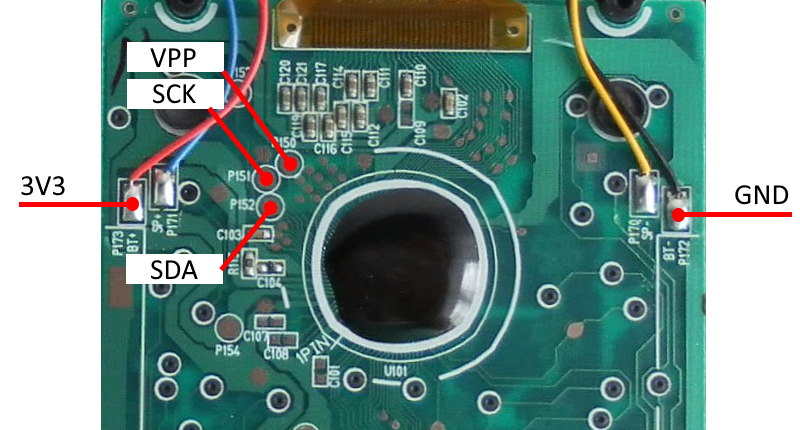
Description of test pads on calculator (click to enlarge):
| Pad | Meaning |
|---|---|
| P150 | VPP - Programming voltage |
| P151 | SCK - RST/SCK - reset/clock |
| P152 | SDA - Communication Data |
Connection between programmer and target (calculator):
| Programmer pin | Calculator Pad |
|---|---|
3.3VOUT | BT+ or P154 or battery contact (positive) |
Vss | BT- or P172 or battery contact (negative) |
VTref | Connect together with 3.3VOUT |
RST_OUT/SCK | P151 |
SDATA | P152 |
Vpp | P150 Only for flashing! |
3. Preparing environment
- Download and install LEXIDE-Ω development tools.
- Download additional target definitions and copy to corresponding directories in
C:\U8Dev\
4. Dumping rom
- In menu start find and run
DTU8 Debugger - In newly opened window select target:
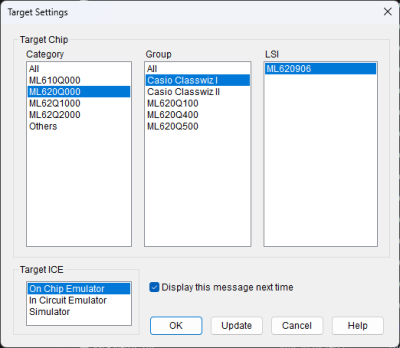
and click OK - If connection is correct you should see window asking for Security ID:

- Enter this:
FFFF FFFF 7379 6771 5961 4753 4143 3137 2329 1719 1113 2307.
(BTW: This password is stored in calculator ROM at address 0xFDE0 in reversed order.) - When password is accepted in main DTU8 window select from menu:
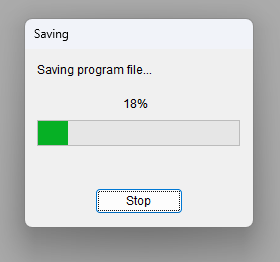
File>Save program to file…and provide file name to store rom. - Rom will be saved to file


5. To do
- Find out how last 8 bytes of security ID was obtained
- Prepare procedure to flash rom
- Create better target file as current one uses larger rom window than necessary
6. Links
rom_dump_cw1.1720277564.txt.gz · Last modified: 2024/07/06 16:52 by cfx