Difference between revisions of "Casio Natural Display series"
Jump to navigation
Jump to search
| Line 9: | Line 9: | ||
| − | == EX Series models == | + | == EX / Claswiz Series models == |
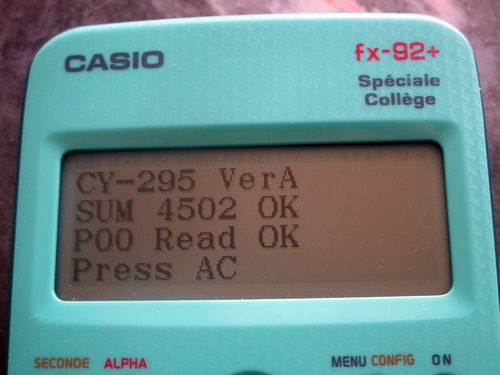
[[File:Fx-92plusSP firmware.jpg|frame|right]] | [[File:Fx-92plusSP firmware.jpg|frame|right]] | ||
| + | To check firmware: | ||
| + | * hold down the [SHIFT] key and the [7] key | ||
| + | * then press and release the [ON] key | ||
| + | * You should see: DIAGNOSTIC / Press AC | ||
| + | * Within 15 seconds press [6] to see diagnostic Menu | ||
| + | * Press [2] to start the Version&Sum test | ||
| + | |||
| + | |||
{| class="wikitable robotic" | {| class="wikitable robotic" | ||
|- | |- | ||
Revision as of 00:06, 2 November 2019
| fx-*ES | fx-*ES PLUS | fx-*EX |
|---|---|---|
 |
 |

|
| GY380/GY381 | GY450 | CY230 |
EX / Claswiz Series models

To check firmware:
- hold down the [SHIFT] key and the [7] key
- then press and release the [ON] key
- You should see: DIAGNOSTIC / Press AC
- Within 15 seconds press [6] to see diagnostic Menu
- Press [2] to start the Version&Sum test
| Firmware | Model |
|---|---|
| CY-235 | fx-991EX |
| CY-236 | fx-82CN X |
| CY-237 | fx-350CN X |
| CY-238 | fx-95CN X |
| CY-239 | fx-991CN X |
| CY-240 | N/A |
| CY-241 | fx-JP500 |
| CY-242 | fx-JP700 |
| CY-243 | fx-JP900 |
| CY-244 | N/A |
| CY-245 | N/A |
| CY-246 | fx-92 Spéciale Collège |
| CY-247 | N/A |
| CY-248 | N/A |
| CY-249 | N/A |
| CY-250 | fx-87DE X |
| CY-251 | fx-991DE X |
| CY-252 | N/A |
| CY-253 | N/A |
| CY-254 | fx-570SP X Iberia |
| CY-255 | fx-991SP X Iberia |
| . . . | N/A |
| CY-295 | fx-92+ Spéciale Collège |
